

Seagate ST5000LM000 5TB External Drive Slow Issue Repair& Data recovery successful
Seagate ST5000LM000 5TB external hard drive experienced severe slow response due to bad sectors.
Data was successfully imaged and recovered using PC-3000 with controlled head access.
Case ID: 0080001
Date: March 2, 2026
Lab: 99DDR Data Recovery Lab – Los Angeles
Lead Engineer: Jason Xu
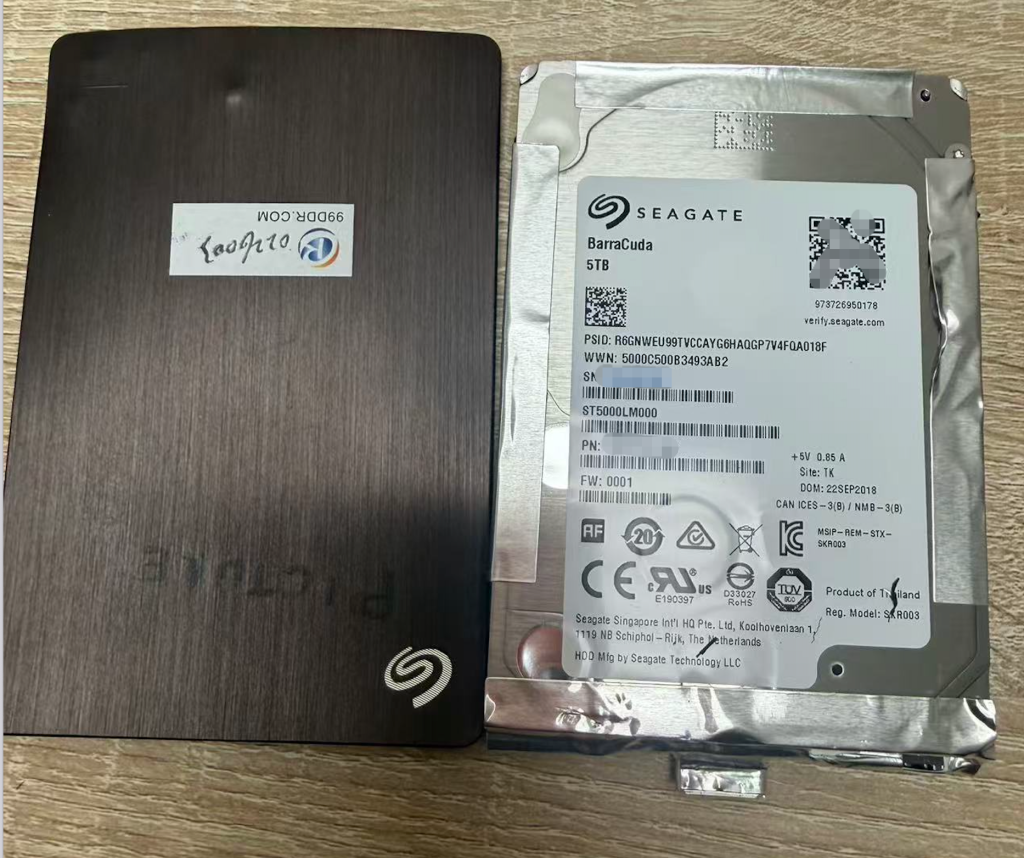
Case Overview
A client brought a Seagate Backup Plus 5TB external hard drive to our lab after experiencing extremely slow file access and eventual failure to mount in Windows.
According to the customer, the drive had never been dropped or physically damaged, but over time it gradually became slower during normal usage.
After several attempts to copy files, the drive eventually stopped responding properly and Windows could no longer load the partition.
Using professional PC-3000 data recovery equipment, our engineers diagnosed the problem as a Seagate F3 slow responding firmware issue.
After firmware repair and controlled disk imaging, the client’s photo data was successfully recovered.
案例概述
客户送修一块 Seagate Backup Plus 5TB 移动硬盘。
客户表示硬盘 没有摔过或受到物理损伤,但在日常使用过程中逐渐变得非常缓慢。
客户多次尝试复制文件后,硬盘响应越来越慢,最终在 Windows 系统中无法加载分区。
通过 PC-3000 专业数据恢复设备检测,工程师确认该硬盘属于 Seagate F3 系列典型慢病问题(Slow Responding Firmware Issue)。
经过固件修复与专业镜像流程,最终成功恢复客户照片数据。
Device Information
Brand: Seagate
Model: ST5000LM000
Capacity: 5TB
Interface: SATA (USB enclosure)
Series: Barracuda Mobile
Manufactured: 2018
设备信息
品牌:Seagate
型号:ST5000LM000
容量:5TB
接口:SATA(USB移动硬盘)
系列:Barracuda Mobile
生产年份:2018
Failure Symptoms
When the drive arrived at our lab, the following symptoms were observed:
• Drive spins up normally
• Seek sound is present
• Long idle spinning after seek operations
• Extremely slow response during read operations
• Windows unable to mount the drive
• PC-3000 scan reveals repeating slow sector patterns
These symptoms strongly indicate a Seagate F3 slow responding firmware issue.
故障现象
在实验室检测时发现以下问题:
• 硬盘可以正常启动
• 可以听到寻道声音
• 寻道后长时间空转
• 读取响应非常缓慢
• Windows无法加载分区
• PC3000扫描出现规律慢块
这些现象属于 Seagate F3 系列典型慢病问题。
Technical Diagnosis
Using PC-3000 Utility, engineers performed a surface scan.
The scan results showed:
• Green blocks mixed with pink slow sectors
• Repeating slow sector patterns
• Abnormally slow firmware response
Based on these observations, the issue was confirmed as a firmware slow responding problem rather than mechanical damage.
技术诊断
在 PC-3000 工具中进行扫描时发现:
• 绿色块与粉色慢块交替出现
• 坏块呈规律分布
• 硬盘响应时间异常缓慢
最终确认该问题属于 固件慢病问题,而非机械损伤。
Recovery Procedure
Step 1 – ROM Backup
Engineers accessed the drive via F3 terminal COM mode and backed up the ROM.
A Tech Unlock procedure was then performed in ROM editing mode.
Step 2 – System Module Access
After power cycling the drive:
• Drive ID became accessible
• System modules could be loaded
However, module loading was extremely slow and CS errors repeatedly appeared in the terminal logs.
Step 3 – Critical Module Backup
To protect firmware integrity, several key modules were backed up:
20D
1B
28
35
348
Step 4 – RAM Configuration Adjustment
RAM parameters were modified to keep only:
Disable Idle Activity
This reduces unnecessary firmware activity during slow responding conditions.
Step 5 – Head-by-Head Testing
Head-by-head reading was tested in DE mode.
All heads showed very slow reading speeds with repeating patterns of:
• Green blocks
• Yellow blocks
• Pink blocks
This confirmed the slow responding firmware condition.
Step 6 – Terminal Firmware Repair
The drive was accessed through F3 Terminal Level 7.
Command executed:
m100
This command reloads the drive’s boot firmware.
Procedure:
- Enter Level 7 terminal mode
- Execute m100 command
- Power cycle the drive
- Reconnect to PC-3000
修复流程
第一步 – ROM备份
通过 F3终端 COM模式读取并备份ROM。
随后在ROM编辑模式下执行 科技解锁。
第二步 – 系统模块读取
重新上电后:
• 可以识别硬盘ID
• 可以加载系统模块
但系统加载非常缓慢,并且终端日志持续出现 CS错误。
第三步 – 核心模块备份
为了保证安全,先备份关键系统模块:
20D
1B
28
35
348
第四步 – RAM参数调整
在RAM配置中仅保留:
禁用空闲活动(Disable Idle Activity)
以减少慢病情况下固件响应负担。
第五步 – 分头检测
在 DE模式下进行分头读取。
所有磁头读取速度都非常慢,并出现:
• 绿色块
• 黄色块
• 粉色块
呈规律分布。
确认属于 慢病固件问题。
第六步 – 终端修复
进入 F3终端 Level 7 模式。
执行指令:
m100
该命令用于 重新加载引导区固件。
操作步骤:
- 进入7级终端
- 执行 m100
- 断电重启
- 重新连接PC-3000
Recovery Result
After firmware repair, the drive response speed returned to normal.
A full disk image was successfully created.
Only about 3000 sectors were unreadable.
Since the client needed photo files, the recovery success rate reached:
99.99% Data Recovery
恢复结果
固件修复后硬盘读取速度恢复正常。
随后进行了全盘镜像。
仅约 3000个扇区无法读取。
客户需要恢复的是 照片文件,最终恢复成功率达到:
99.99%
Engineer Notes
Seagate F3 slow responding issues are common in large-capacity mobile drives.
Repeated read attempts by users often worsen the condition.
If a hard drive becomes extremely slow, it is recommended to stop using the device immediately and seek professional recovery services.
工程师备注
Seagate F3 系列硬盘在大容量移动硬盘中较常见慢病问题。
用户反复尝试读取数据往往会导致问题加重。
如果硬盘突然变得非常缓慢,应 立即停止使用并寻求专业数据恢复服务。
About 99DDR Data Recovery Lab
99DDR Data Recovery Lab specializes in professional recovery services for hard drives, SSDs, RAID arrays, and external storage devices.
Our lab uses industry-leading tools including PC-3000 systems, firmware repair techniques, and advanced disk imaging technologies to recover data from logically and physically damaged storage devices.
Location: Los Angeles, California
Service Area: Southern California & Nationwide Mail-In Recovery
关于 99DDR 数据恢复实验室
99DDR 数据恢复实验室专注于硬盘、SSD、RAID阵列以及各类存储设备的数据恢复服务。
实验室使用 PC-3000专业设备、固件修复技术以及高级镜像技术,能够处理各种逻辑故障与物理故障的数据恢复。
实验室位置:美国洛杉矶
服务范围:南加州本地及全美邮寄恢复服务